People Count Aggregation Overview
What This Feature Does
People count aggregation turns raw sensor activity into an area occupancy history.
At high level:
- Sensors report counts over time.
- System decides which sensor counts belong to which area and when.
- System applies resets when staff intentionally restart count.
- System stores running area count in time-based steps.
Result is not raw sensor traffic. It is cumulative area count over time after aggregation rules have been applied.
Why Aggregation Exists
Raw sensor numbers are not enough on their own.
Real-world setup has complications:
- sensor may only belong to area during part of event
- one sensor may count in reverse direction for specific area
- area count may need manual or scheduled reset
- sensors may have data before they were assigned to area
- teams often want stable time-based history, not isolated raw readings
Aggregation handles those rules and turns them into one usable number series.
Big Picture

Main Ideas
+ Area Count Is Cumulative
Area count is running total.
If one window adds +5, and next adds +3, area count becomes 8.
If later window adds -2, area count becomes 6.
[] Assignments Decide When Sensor Counts
Sensor can exist and produce data before it is officially assigned to area.
That earlier data is ignored for that area.
If assignment ends, later sensor data is ignored too.
<-> Direction Can Be Flipped
Sometimes sensor is physically installed in way that reverses meaning of in and out for area.
When assignment is marked as flipped, system reverses net effect for that sensor while that assignment is active.
! Resets Restart Count
Reset says: “From this moment, treat area count as this new value.”
Reset does not edit history before that point. It becomes new starting point going forward.
| | Time Is Processed In Fixed Windows
Aggregation happens in fixed time windows.
In this system, that window size is fixed by configuration.
For example, if step size is 10 minutes, event timeline is broken into windows like:
10:00-10:1010:10-10:2010:20-10:30
Each window gets one cumulative result.
Simple Example
Imagine:
- event runs from
10:00to10:30 - aggregation window size is
10 minutes - one sensor is assigned to area from
10:05to10:25 - sensor reports these interval counts:
10:00-10:10with net+510:10-10:20with net+610:20-10:30with net+210:25-10:35with net+9
What happens:
10:00-10:10is ignored because interval starts before assignment starts10:10-10:20counts10:20-10:30counts10:25-10:35is ignored because interval starts exactly when assignment has ended
So windows become:
10:00-10:10-> count stays010:10-10:20-> count becomes610:20-10:30-> count becomes8
Example Visualization
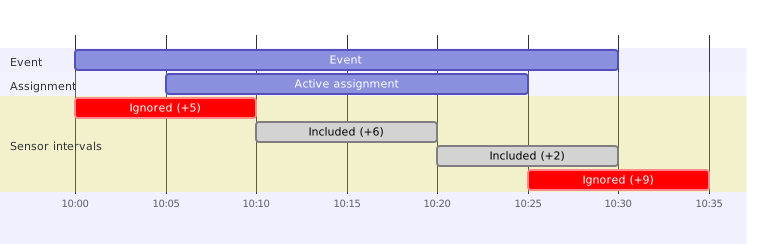
This shows same raw intervals, but only intervals that start while assignment is active are included.
Reset Types
There are three reset sources:
-
Event start Count starts at
0unless higher-priority reset exists at same time. -
Single reset Manual one-time reset at exact timestamp.
-
Recurring reset Repeating scheduled reset, often daily at same local time.
If more than one reset lands at same timestamp, system uses highest-priority reset.
Reset Example
Imagine area count has reached 42 by 13:00.
Team performs reset to 10 at 13:05.
From that moment:
- history before
13:05still shows old path - count at reset point starts from
10 - later sensor activity adds or subtracts from
10

Summary
People count aggregation answers simple question:
“What should area occupancy have been over time, after applying all real-world rules about assignments, sensor direction, resets, and time windows?”
That answer powers current count views, history charts, and alerting.